Kaniva water meters
How to read your water meter
Find the digital display
Open the meter lid and look at the screen in the center. This shows your water usage.
Read the number on the screen
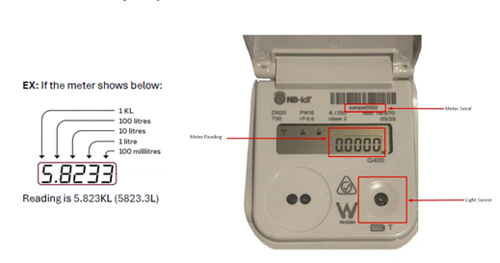
The number looks like this: 5.8233
This is measured in kilolitres (kL).
1 kL = 1,000 litres
Understand what the digits mean
Whole number (before the decimal) = kilolitres - Example: 5 = 5 kL (5,000 litres)
First decimal = 100 litres
Second decimal = 10 litres
Third decimal = 1 litre
Fourth decimal = 100 millilitres
Example
If your meter shows 5.8233, that means:
5 kL = 5,000 litres
.8 = 800 litres
.02 = 20 litres
.003 = 3 litres
.0003 = 0.3 litres
Total: 5,823.3 litres (or 5.823 kL)