
eNotices is an online portal which allows you to register, view, and pay your water bill online.
To register:
- Find the eNotices logo on your water bill
- Use the code to register at gwmwater.enotices.com.au
Your water bill will then be emailed to you and you will be able to pay your water bill online.
By registering, you will be able to not only receive and pay your water bill online, but also:
- Manage all your properties’ accounts.
- Send bills to multiple email addresses.
- Print off additional copies.
- Access your bill on any electronic device (smart phone, tablet, laptop, or desktop).
- View your current and past bills.
- Pay your bill through our online payments portal via credit card, Apple Pay or Google Pay.
Switching from paper to email bills is easy, plus you can switch back if you prefer the old way at any time.
If you have any questions, please feel free to contact us.
Please note:
- If you’re registered for our Customer Portal, you will still need to register for eNotices if you would like to receive your water bill via email.
- Don’t worry - you will still be able to receive your water bill via paper if you prefer. Simply don’t register, and your water bill will continue to be mailed to you each quarter.
Frequently asked questions
Reference number
The eNotices Reference Number is unique to your most recent water bill and is located on the first page of your water bill.
There will be the eNotices ‘e’ logo next to it.
If you are having issues with your eNotices Reference Number, please contact us on 1300 659 961 during business hours.
Email and password
Please check the Junk / Spam folders in your email account.
If you still have not received it, please contact us on 1300 659 961 during business hours.
You can reset your password using the ‘Forgot Password’ button on the eNotices login page.
To change your email address, go to the ‘Profile’ tab on the eNotices Dashboard. Then enter your new email address and click 'Save'.
To ensure your future water bills are sent to this new email address, you will need to resend the verification link to your new email address.
To do this, return to your Profile page and click the ‘Resend Verification’ button. You will now be sent an automated verification email.
Follow the prompts in this email to ensure your new email address is approved.
Yes, once you have registered to receive your water bills via email, you can add additional email addresses to receive the water bill too.
To do this, go to the ‘Emails’ tab in the ‘Profile’ section of the eNotices Dashboard.
Here you can input additional email addresses to send the water bill to.
Simply type in the email address and click ‘Add’.
If you no longer wish to receive your water bill by email, you can choose to receive it by paper instead.
Under the ‘Accounts’ tab on your ‘Profile’ in the eNotices Dashboard, you can change your delivery method.
If you choose 'Post', your future water bills will be sent to the last advised mailing address.
While we do all we can to ensure your notice goes directly to your email’s inbox, it is possible that it will go into another folder such as ‘Promotions’, ‘Updates’ or ‘Junk / Spam’.
Please check your 'Junk / Spam' folders and mark the sender as safe to receive future water bills to your inbox.
Flexipay
FlexiPay is a payment management system that provides our customers with flexible payment options for their water bills.
Step 1: Visit the website
- Scan the QR code (located on the front page at the bottom of your latest water account).
Or visit gwmwater-pay.enotices.com.au. Make sure you have your eNotice reference number (located on the front page of your latest water account) before you start.
Step 2: Your details
- Check your details are correct that have autofilled.
- Enter your mobile number and email address.
- Click Submit.
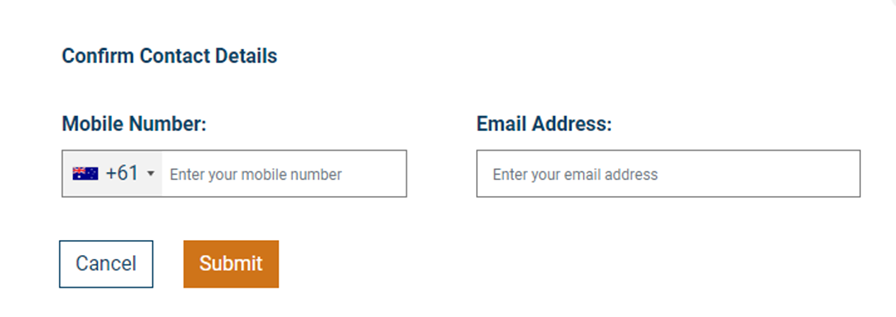
Step 3: Choose your payment option
- Select your preferred payment option and follow the prompts to set up payment details.
If you choose 'Set up Direct Debit', an email from
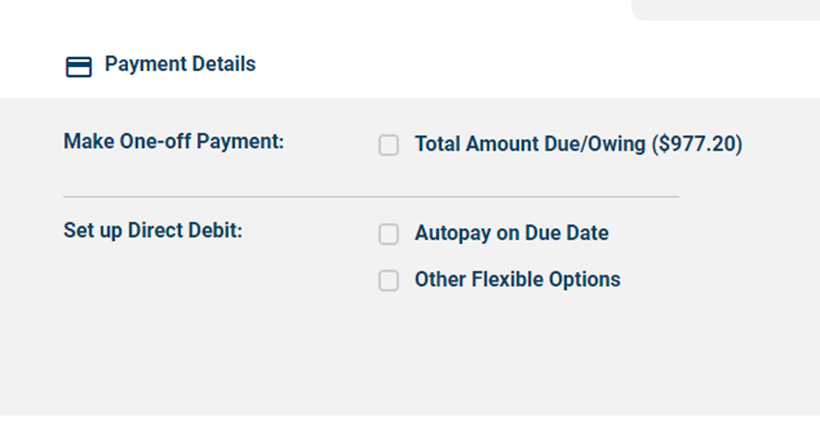
You can:
- Make a one-time payment of your water bill
- Set up an ongoing direct debit schedule
Payments can be made via either credit card (Visa, Mastercard, as well as international credit cards) or via bank account.
One-time payments can also be made via Apple Pay and Google Pay on compatible devices.
No, FlexiPay can be used by all GWMWater customers, even if you don’t have an eNotices account.
The eNotices Reference Number is used by the system to easily find the details of your notice such as the Name, Account Number, and Amount Due.
Please check that you have typed the code in correctly, and ensure there are no spaces at the beginning or end of the reference number.
If you are having trouble with your eNotices Reference Number, please contact us on 1300 659 961 during business hours.
All direct debit requests are sent to our team for review. You should hear from us within three business days regarding the outcome.
If your request is approved, you will receive an email confirming the details, with a link to securely enter your payment method.
If we have any questions or want to discuss your proposed direct debit arrangement with you, we may contact you via the email or phone number provided in the request.
If you are setting up a direct debit schedule, FlexiPay will send you an email with a secure link to provide your payment method details.
This is to make sure that the email address you have entered is valid, so we know that you will receive emails regarding the schedule (such as transaction receipts, card expiry reminders, or updates to your schedule).
If you have an eNotices account, you will be able to see the details of your payment schedule in the ‘Manage Payments’ tab in the Dashboard.
If you do not have an eNotices Account, please contact us and we can provide these details to you by phone on 1300 659 961 during business hours, or via email at
Other questions
If you have multiple properties with GWMWater under identical names and postal address, then these properties will be automatically grouped and added to your account when you register.
If you have additional properties with GWMWater under different names or postal addresses, then you can add these water bills to your account in the ‘Accounts’ tab in the ‘Profile’ section of the eNotices Dashboard.
Note: If you have registered multiple properties with different names and postal addresses, then you will receive one email for each property – one property, one email, one attachment.
Yes. If you’re registered for our Customer Portal, you will still need to register for eNotices if you would like to receive your water bill via email.
Once you have signed up for eNotices, your future water bills will be emailed to you and be able to be payed online.
Your October 2023 water bill will need to be paid via the options listed on your paper bill.
No, at this point in time you will only be able to see your water bills from October 2023 on your eNotices account.
Your mobile number is collected if we need to communicate with you via SMS in the future.
When you move into a new rental property, your eNotice reference number will move with you. You will have access to your water bills relating to your previous tenant property up until the day you moved out.
