
Paying your bill is straightforward and convenient.
We issue customers with four water bills per year which covers service charges and/or water usage.
You may choose to receive your water bill through the post, via email or electronically through BPay View.
To register to receive your bill via email, simply find the eNotices logo on your water bill and use the code to register at gwmwater.enotices.com.au. More information about eNotices can be found here.
Choose the most suitable way to pay from the following options. If you require assistance, please call GWMWater on 1300 659 961 during business hours.
Struggling to pay your water bill and need help?
Payment options
Direct debit
FlexiPay is a direct debit payment option that is secure, flexible and is an easy way to pay your water bill.
You'll be able to pay an amount that suits your budget, such as weekly, fortnightly, monthly or quarterly during the financial year by creating a payment schedule or you can make a one-off payment. The payment amount will automatically be debited from your nominated bank account, credit card, Apple Pay/Google Pay.
Direct debit can be easily set up via our Customer Portal or click here to register. Please use your eNotices reference number from your latest bill.
When setting up your direct debit payment schedule, FlexiPay will send you an email with a secure link to provide your payment details. Please click on the link and follow the prompts.
For more information about FlexiPay check out our Frequently Asked Questions or contact us.

Online by Credit Card
You can pay your account online (or over the phone) by credit card using POSTbillpay. Your POSTbillpay code and reference number are on the back of your bill, toward the bottom of the page.
Go to www.postbillpay.com.au or call 13 18 16.

BPAY - Biller Code 79855
It's easy to pay your bill online through your cheque, savings or credit card account with BPAY:
- Login to your bank account online or via mobile (or phone your bank to arrange BPAY over the phone).
- Choose the BPAY option.
- Enter the GWMWater Biller Code - 79855, the payment amount and your account number (find it on the top of your GWMWater bill).
- Check all your information is right, and pay your bill!
- Often systems will save the details, so next time you login you can choose GWMWater as an option and your information won't need to be re-entered.
Centrepay
Centrepay is a voluntary bill-paying service which is free for Centrelink customers. Use Centrepay to arrange regular deductions from your Centrelink payment. You can start or change a deduction at any time. The easiest way to do it is through your Centrelink account online in myGov.

When you receive your water bill, you'll notice the bottom portion is detachable. To pay by mail, detach this bottom part, fill out the form and mail with a cheque to:
GWMWater
PO Box 481
Horsham Vic 3402

In person
You can pay your bill in person by visiting us at our Corporate Office or at an Australia Post Office. Present your account and pay by cheque, cash or Eftpos. If you are experiencing difficulty in paying your water and sewerage bill, please get in touch with us on 1300 659 961 as soon as possible so we can help.
Policy on late payments
Urban accounts
If we don't receive your payment within office hours by the due date shown on your account, charges will apply. Late payments may also incur an interest penalty calculated from the date of issue.
Rural accounts
Late payments will incur an interest penalty calculated from the due date.
FlexiPay Frequently Asked Questions
FlexiPay is a payment management system that provides our customers with flexible payment options for their water bills.
Step 1: Visit the website
- Scan the QR code (located on the front page at the bottom of your latest water account).
Or visit gwmwater-pay.enotices.com.au. Make sure you have your eNotice reference number (located on the front page of your latest water account) before you start.
Step 2: Your details
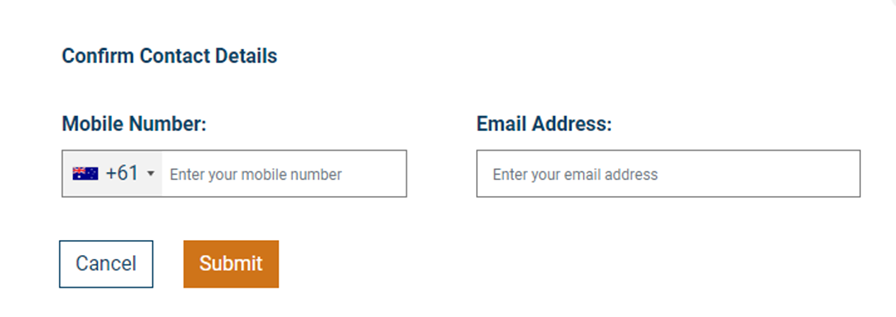
- Check your details are correct that have autofilled.
- Enter your mobile number and email address.
- Click Submit.
Step 3: Choose your payment option
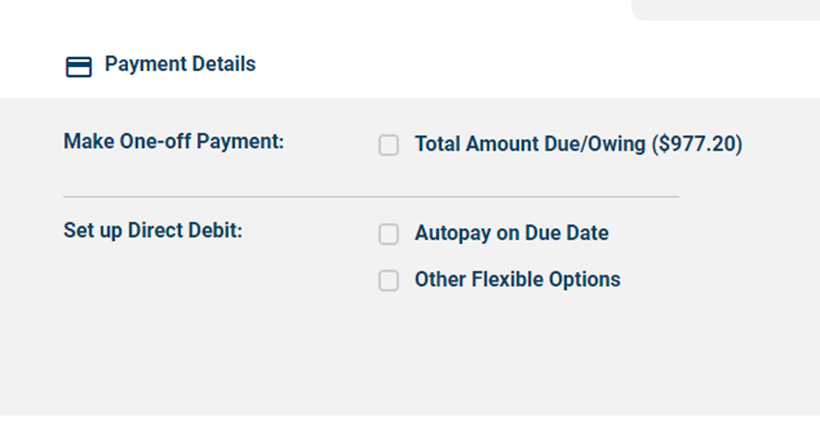
- Select your preferred payment option and follow the prompts to set up payment details.
If you choose 'Set up Direct Debit', an email from
You can:
- Make a one-time payment of your water bill
- Set up an ongoing direct debit schedule
Payments can be made via either credit card (Visa, Mastercard, as well as international credit cards) or via bank account.
One-time payments can also be made via Apple Pay and Google Pay on compatible devices.
No, FlexiPay can be used by all GWMWater customers, even if you don’t have an eNotices account.
The eNotices Reference Number is used by the system to easily find the details of your notice such as the Name, Account Number, and Amount Due.
Please check that you have typed the code in correctly, and ensure there are no spaces at the beginning or end of the reference number.
If you are having trouble with your eNotices Reference Number, please contact us on 1300 659 961 during business hours.
All direct debit requests are sent to our team for review. You should hear from us within three business days regarding the outcome.
If your request is approved, you will receive an email confirming the details, with a link to securely enter your payment method.
If we have any questions or want to discuss your proposed direct debit arrangement with you, we may contact you via the email or phone number provided in the request.
If you are setting up a direct debit schedule, FlexiPay will send you an email with a secure link to provide your payment method details.
This is to make sure that the email address you have entered is valid, so we know that you will receive emails regarding the schedule (such as transaction receipts, card expiry reminders, or updates to your schedule).
If you have an eNotices account, you will be able to see the details of your payment schedule in the ‘Manage Payments’ tab in the Dashboard.
If you do not have an eNotices Account, please contact us and we can provide these details to you by phone on 1300 659 961 during business hours, or via email at
Our obligations to youWe're committed to serving our customers and have developed a charter to reflect our ongoing commitment to you and the community:
|

